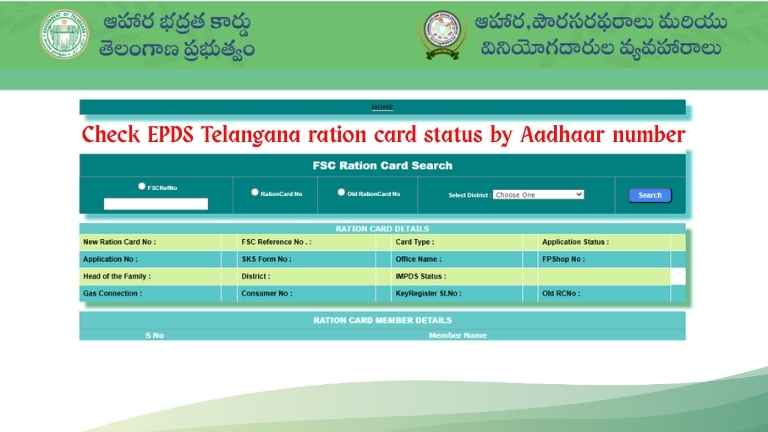
The ePDS Telangana (Electronic Public Distribution System) is a digital system designed to make ration card services and reporting transparent, quick, and easy for residents of Telangana. Through the ePDS portal and associated mobile app, citizens can access ration card details, application status, reports from fair price shops, and grievance mechanisms—all at the click of a button.
Over the years, it has become a vital tool for ensuring food security and ease of access to government subsidies through efficient technology.
Why ePDS Telangana Matters
- The ePDS Telangana at its core is about simplifying the delivery of food security benefits to the deserving. It assures greater transparency by letting citizens have a look or check:
- Ration card status and application progress,
- Stock availability at fair price shops (FPS),
- Reports on card seeding and fair shop performance,
- Release orders (ROs) and other administrative actions.
By digitising these systems, it fosters trust and accountability in the Public Distribution System.
The T-Ration Mobile Application
Telangana’s T-Ration app, developed by CCS & NIC, brings ePDS services to a mobile platform. Updated as recently as July 11, 2025, the app provides both citizen-facing (G2C) and government-to-government (G2G) services
On the G2C side, citizens can:
- Search for their Food Security Card (FSC),
- See ration card allocation and transaction history,
- Check real-time stock at FPS,
- Track RO status and view FPS location maps.
On the G2G side, authorised officials can access:
- Application status,
- Card unit reports,
- Aadhaar seeding status,
- Supply chain management reports including ePoS transactions,
Accessing the ePDS Telangana Portal
The central hub for all services is the ePDS Telangana portal, accessible via the Food Security Act section of epds.telangana.gov.in.
Here, users will find features such as:
- FSC Search / Ration Card Details that allow the user to check application status and card details using FSC reference number, ration card number, or district information.
- Dormant FSC Card Status Report, which gives reports based on districts regarding how many cards are idle or inactive as of the given date. For instance, this status report was issued as of 10 August 2025.
- Monthly Key Register Report empowers a user to view keys distributed or used during any month in any region.
- RO status, and other reports, such as seeding status, shop details, and card status summary.
Step-by-Step: How to Check Ration Card Status Online
- Go to the official portal of Telangana ePDS.
- Input your FSC reference number, ration card number, old ration card number, or district.
- Click Search
- The system will display the status of the application, e.g., pending verification, approved, ready for download, and so on.
How to Download Your Ration Card Using Aadhaar
The ePDS portal also supports downloading your ration card, ideally after it becomes available in the system. The general steps are:
- Visit the ePDS Telangana website.
- Use the FSC Search or equivalent section.
- Provide your Aadhaar number (if the portal supports Aadhaar-based lookup).
- Upon finding your card, you should be able to download a PDF version directly.
This digital download eliminates the need to physically visit a MeeSeva center, making the process much simpler.
Viewing Ration Card Lists and Reports
If you’re curious to see ration card lists for your area:
- Go to the portal’s Reports section.
- Choose Ration Card Reports.
- Click on FSC Card Status Report.
- The portal will display all associated ration cards with their statuses
This is especially useful for community monitoring or verifying allocations at FPS.
ePDS Telangana Application Status (Including New Cards)
With ePDS in place, users can check how far along their new ration card application is:
- A user needs to enter his or her application number or reference number on the FSC Search.
- Then the portal will indicate if the application has been either in verification or data entry stage or approved.
Food Security Schemes and ePDS
The Food Security Card (FSC), including variants like AFSC (Antyodaya Food Security Card) and AAY (Antyodaya Anna Yojana Card), ensures that the most economically disadvantaged and vulnerable households receive fair and subsidized food grains.
By integrating these with ePDS, Telangana ensures card distribution, monitoring, and grievance redressal are carried out efficiently, thereby strengthening the state’s food security framework.
Transparency and Reports
ePDS does more than provide access—it encourages oversight:
- Dormant Card Reports show inactive cards, helping administrators and citizens identify cards that may need renewal or follow-up
- Monthly Key Register Reports and RO Status Reports provide data that can be critically useful for auditing stock and administrative flows
This flow of information ensures accountability from FPS dealers up through MIS systems, all accessible through the web portal or the mobile app.
Summary
In simple words, ePDS Telangana brings ease, clarity, and access to ration card services. Whether you’re applying for a new card, downloading existing ones with your Aadhaar, checking stock at an FPS, or filing a grievance—everything is accessible online. The T-Ration app complements the portal for on-the-go use, and YouTube guides offer helpful walkthroughs.
Here’s how to start:
- Visit the ePDS Telangana portal.
- Use FSC Search for status and downloads.
- Visit Reports to view regional card data.
- Lodge or check grievances as needed.
- Install T-Ration app for mobile access.
- Watch a video tutorial to learn the process visually.
Through this digital system, Telangana has made food security more transparent, responsive, and citizen-friendly—empowering residents with greater control and clarity.
FAQs:
1. How do I check the status of a new ration card online in Telangana?
To check your ration card status, visit the official ePDS Telangana portal and go to the FSC Search section. Enter your reference number, application number, or other required details. The portal will instantly display your application’s current status, including whether it is pending, approved, or issued.
2. How do I download my ration card using Aadhaar?
Once your ration card is approved and active, go to the ePDS Telangana FSC Search page. Select the Aadhaar option, enter your Aadhaar number, and verify your identity. The system will display your ration card details and allow you to download it in PDF format for printing or future use.
3. Can I check ration card status using Aadhaar number?
Yes. The ePDS Telangana portal offers Aadhaar-based search features. Simply choose the Aadhaar option under FSC Search, enter your Aadhaar number, and submit. You can view your ration card’s approval status, issuance date, and active details. This method is convenient if you do not have your application or reference number.
4. Can I view detailed ration card reports?
Absolutely. On the ePDS Telangana website, navigate to Reports → Ration Card Reports → FSC Card Status Report. Here, you can filter by district, ration shop, or other parameters to view a complete list of ration cards, their statuses, and related beneficiary details in a structured, easy-to-read format.
5. What if I have a grievance or issue?
If you face issues like incorrect details or non-delivery of ration, go to the portal’s Grievance Redressal System for End-to-End Public Distribution System (E2E PDS). Lodge your complaint with relevant details. You can later track the complaint status until the issue is resolved by the concerned authorities.
6. Is there a mobile app for these services?
Yes. The T-Ration mobile app provides both citizen and administrative services. Citizens can check stock availability, transaction history, and ration card status, while administrators can access detailed reports, stock positions, and distribution data. As of mid-2025, the app continues to improve with updated features for ease of access.
7. Can I check my ration shop’s stock availability online?
Yes. Both the ePDS Telangana portal and the T-Ration app allow you to view stock positions for your assigned ration shop. This feature shows available quantities of rice, wheat, sugar, and other commodities so beneficiaries can plan visits to collect their rations without unnecessary delays or repeated trips.
8. How do I apply for a new ration card in Telangana?
You can apply online via the Meeseva portal or visit a local Meeseva center. Submit required documents such as proof of residence, Aadhaar cards for family members, and income proof. Your application will be processed through verification before approval, after which it will appear in the ePDS Telangana database.
9. Can I transfer my ration card to another district in Telangana?
Yes. You can request a transfer by applying at a Meeseva center or through the ePDS portal, depending on the service availability. Provide your current ration card details, Aadhaar numbers, and new address proof. Once processed, your ration card will be linked to your new district’s fair price shop.
10. How often is ration card data updated on the portal?
The ePDS Telangana portal updates its ration card database regularly, often in real-time or within 24 hours of changes. This includes new applications, deletions, stock updates, and beneficiary modifications. Regular updates ensure that citizens always have access to accurate, up-to-date ration and benefit information.
Online Check for Tamil Nadu Land Records
National Education Policy 2020